# ascii-arter
Animated ASCII art backgrounds for the web.
Design a scene in the [ASCII Arter editor](https://lowgame.github.io/Ascii-Arter/), export the JSON, then mount it on any DOM element with a single call.
## Links
- Editor: https://lowgame.github.io/Ascii-Arter/
- Examples gallery: https://lowgame.github.io/Ascii-Arter/examples/
- Demo landing pages:
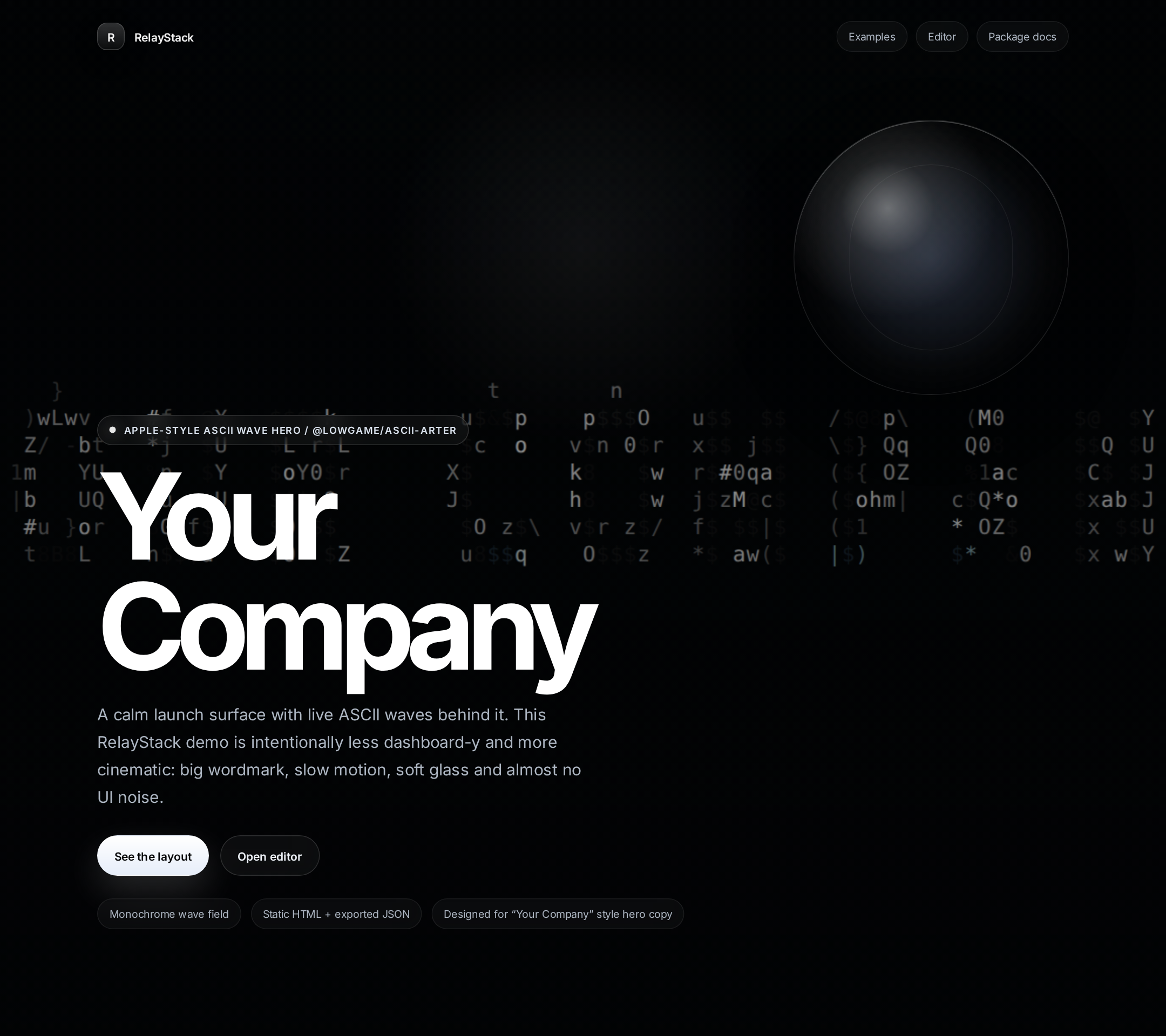
- RelayStack — Apple-style ASCII wave hero with **Your Company** front copy — https://lowgame.github.io/Ascii-Arter/examples/relaystack/
- PulseBoard — https://lowgame.github.io/Ascii-Arter/examples/pulseboard/
- Vaultflow — https://lowgame.github.io/Ascii-Arter/examples/vaultflow/
- Chromawave — colorful wave launch page with floating product cards — https://lowgame.github.io/Ascii-Arter/examples/chromawave/
- OrbitDeck — orbital ribbon layout with floating product cards — https://lowgame.github.io/Ascii-Arter/examples/orbitdeck/
- Repository: https://github.com/lowgame/Ascii-Arter
## Why use it?
- Mount animated ASCII backgrounds on any element
- Works with exported JSON from the ASCII Arter editor
- Supports both **ESM** and **CommonJS**
- Ships with **zero runtime dependencies**
- Includes helpers for loading and re-serializing project data
- Good fit for hero sections, landing pages, splash screens, and interactive demos
- Can power artistic Apple-style launch pages like the RelayStack **Your Company** wave demo
- Also works for colorful wave pages and floating card layouts like Chromawave and OrbitDeck
## Install
```bash
npm install @lowgame/ascii-arter
```
## Basic usage
### 1) Create a container
Your target element needs a real size.
```html
Your Company
ASCII wave background behind this content.
```
### 2) Mount a project
```js
import AsciiBackground, { parseProjectData } from '@lowgame/ascii-arter';
const response = await fetch('/ascii-project.json');
const json = await response.text();
const project = parseProjectData(json);
const bg = AsciiBackground.mount('#hero', project);
```
That’s it — the package injects a canvas into the container and starts animating immediately.
## Recommended workflow
1. Open the editor: https://lowgame.github.io/Ascii-Arter/
2. Build your scene visually
3. Export the project JSON
4. Save it in your app (for example `public/ascii-project.json`)
5. Load it and mount it with `AsciiBackground.mount(...)`
## ESM example
```js
import AsciiBackground, { parseProjectData } from '@lowgame/ascii-arter';
async function boot() {
const response = await fetch('/hero.json');
if (!response.ok) throw new Error(`Failed to load hero.json: ${response.status}`);
const json = await response.text();
const project = parseProjectData(json);
const bg = AsciiBackground.mount('#hero', project);
// optional controls
document.getElementById('pause')?.addEventListener('click', () => bg.pause());
document.getElementById('play')?.addEventListener('click', () => bg.play());
}
boot();
```
## CommonJS example
Use this if your app/bundler still consumes CommonJS in the browser.
```js
const { AsciiBackground, parseProjectData } = require('@lowgame/ascii-arter');
const project = parseProjectData(window.__ASCII_PROJECT__);
AsciiBackground.mount(document.getElementById('hero'), project);
```
## CDN example
```html
Launch faster
```
## API
### `AsciiBackground.mount(selectorOrElement, projectData, options?)`
Creates and starts a new background instance.
- `selectorOrElement`: a CSS selector string or a real DOM element
- `projectData`: project JSON as a string or plain object
- `options`: reserved for future use
Returns an `AsciiBackground` instance.
### Instance methods
#### `play()`
Resume animation.
#### `pause()`
Pause animation.
#### `load(projectData)`
Replace the current scene with a new exported project.
```js
const nextProject = await fetch('/pricing.json').then((r) => r.text());
bg.load(nextProject);
```
#### `update(partial)`
Apply a top-level partial update, then normalize and re-render the scene.
> Note: this is not a deep merge for nested structures like `texts`, `svgLayers`, or `subject`.
```js
bg.update({
palette: 'aurora',
speed: 0.8,
});
```
#### `toJSON(space = 2)`
Serialize the currently running scene back to JSON.
```js
const snapshot = bg.toJSON();
```
#### `destroy()`
Stop animation, disconnect observers, and remove the injected canvas.
```js
bg.destroy();
```
## Utility exports
### `parseProjectData(input)`
Accepts:
- exported JSON string
- plain object
- `null` / `undefined` (falls back to a default project)
```js
const projectA = parseProjectData('{"palette":"matrix"}');
const projectB = parseProjectData({ palette: 'aurora' });
```
### `serializeProjectData(project)`
Strips runtime-only fields and returns embed-safe project data.
```js
import { serializeProjectData } from '@lowgame/ascii-arter';
const cleanProject = serializeProjectData(project);
```
## Layout notes
- The target element must have a real width/height
- The package prepends an absolutely positioned canvas into the container
- If the container has `position: static`, the package sets it to `position: relative`
- Your foreground content should usually have `position: relative; z-index: 1`
- For hero sections, `overflow: hidden` is usually the right default
## Security note
If your project data contains user-provided SVG, sanitize it before passing it into the package. The library is designed for trusted project JSON exported from the editor.
## Tested package contents
The published package contains only:
- `LICENSE`
- `dist/ascii-arter.cjs`
- `dist/ascii-arter.esm.js`
- `README.md`
- `package.json`
## Maintainer note
Building this package locally uses `esbuild` and currently expects a modern Node runtime (Node 18+ recommended for contributors/CI).
## License
MIT